

A simpler way to plan parents' evening
SMID Parents' Evening puts your appointments, teachers and timings together in one clear place. Choose times that suit you, keep track of every booking and join online calls directly when your school is running a video event.
Your school will email your sign-in details when booking opens.
Your evening, made easy.
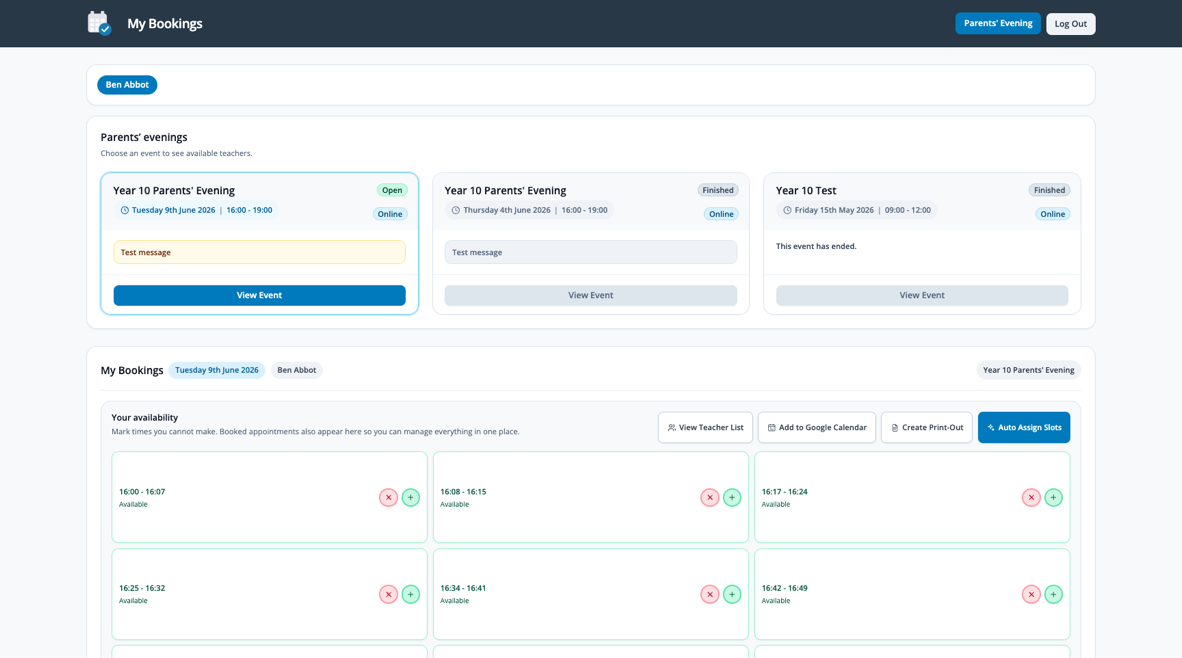
The event card in SMID will tell you whether your school's evening is online or in person and show any important message from the school.
-
1
Open your invitation
Use the username and temporary password emailed to you by SMID, then create a secure password.
-
2
Book your appointments
Set the times you cannot attend, then select slots yourself or ask SMID to arrange them automatically.
-
3
Keep everyone together
Invite another parent or guardian when they need their own video-call window for the same appointments.
-
4
Attend the evening
Follow your schedule in person, or use Join Call at the appointment time for an online event.
From invitation to appointment, step by step.
Watch the short walkthrough to see how to sign in, set your availability, book appointments and move through an online parents' evening.
The complete parent how-to guide
Need help with your invitation or bookings? Please contact your school, who can check the event and your account details.